
ERP for a small factory in India: the modules you actually need
By Milan Tailor, founder of CodBizz · Updated 21 October 2026 · 6 min read
Short answer
A small factory needs five things from an ERP before anything else: a bill of materials for each product, production orders that use up raw material, stock tracked by location with low-stock alerts and transfers, invoicing with customer and supplier ledgers, and a dashboard that shows the numbers an owner checks every day. Everything else can be added later.
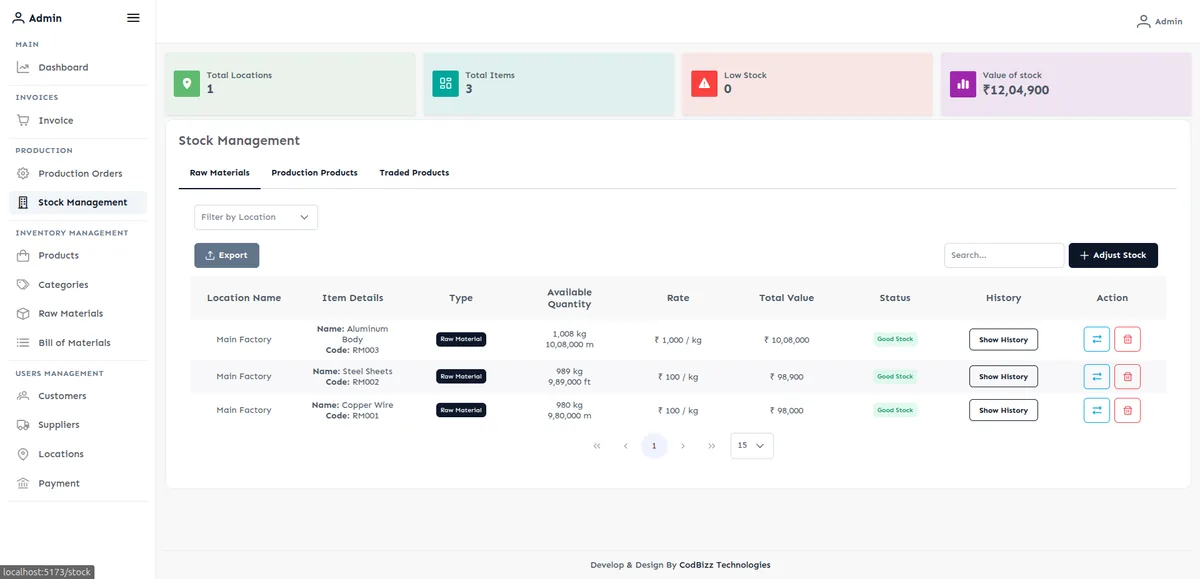
The five modules to start with
- Bill of materials (BOM). The list of raw materials and quantities needed to make one unit of a product. Without it you cannot plan purchases or cost a product.
- Production orders. An order to make a quantity of a product, which uses up raw material and adds finished goods to stock.
- Multi-location stock. Stock by plant, godown or shop, with low-stock alerts and transfers between locations.
- Invoicing and ledgers. Sales invoices you can export as PDF, plus customer and supplier ledgers so you know who owes what.
- Owner dashboard. A single screen with sales, stock and key figures, so the owner does not have to ask for reports.
How the data should flow
A good ERP records each step once and reuses it in the next. This is the flow to look for in a demo.
| Step | What is recorded | What you can answer afterwards |
|---|---|---|
| Purchase | Supplier, material, quantity, rate | What do we owe each supplier, and what did material cost? |
| Stock in | Material received into a location | How much of each material is in each godown? |
| Production order | Product, quantity, raw material used | What did this batch consume, and what was made? |
| Finished goods stock | Product added to stock | What can we sell today? |
| Sales invoice | Customer, product, price, tax | What did we sell, to whom, at what margin? |
| Ledger | Invoice and payment against the customer | Who has not paid, and for how long? |
An example from a live system: DC Motors
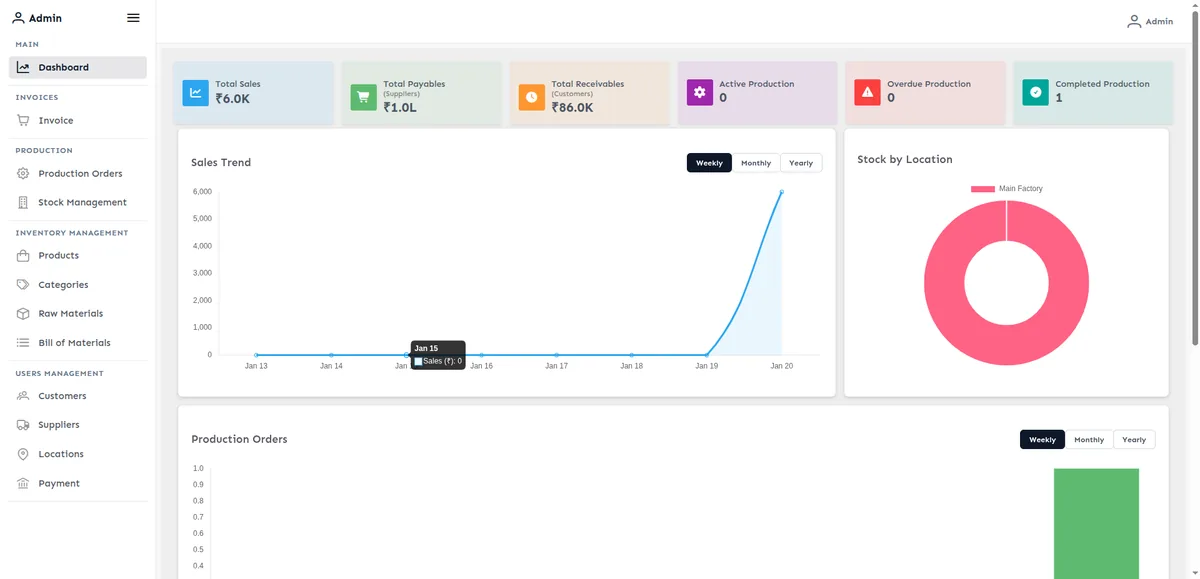
We built and maintain the ERP for DC Motors, a manufacturing business in India. It covers the modules above:
- Production orders and a bill of materials.
- Multi-location stock with low-stock alerts and transfers.
- Invoicing with PDF export.
- Customer and supplier ledgers.
- A KPI dashboard.
What to add later
- Payroll, attendance and leave.
- Quality checks and rejection records.
- Maintenance schedules for machines.
- Approval workflows for purchases and discounts.
- Notifications by email or WhatsApp.
- A mobile view for the shop floor.
Mistakes to avoid
- Buying every module at once. Roll out one, make it stick, then add the next.
- Skipping the opening stock clean-up. A system that starts with wrong stock never catches up.
- Having no owner dashboard, so the system is used for data entry but not for decisions.
- Letting each department keep its own Excel sheet beside the ERP.
Frequently asked questions
What is a bill of materials?
A bill of materials (BOM) lists the raw materials and quantities needed to make one unit of a product. An ERP uses it to plan purchases, consume stock on production orders and calculate product cost.
Does a small factory need an ERP?
Size alone is not the test. The signal is repeated manual work: data typed twice, stock that does not match the shop floor, production planned from memory, or owners who cannot see margin and outstanding without asking.
Can the ERP produce GST invoices?
Invoices are generated with PDF export, and we configure invoice formats and GST fields to your scenarios. Share your scenarios on the discovery call and we will confirm what is covered.
Do we own the code and data?
With us, yes. All code lives in your repositories and your cloud accounts, so you can leave at any time with everything intact.
Want a straight answer for your case?
Book a free 30-minute call or send the form. We tell you honestly what fits, including when you do not need us.
Book a Free Discovery Call →Get a free ERP demo
Tell us what you make. We reply within one business day.

